Git & Collaboration
Version control is not optional. Every experiment, every model, every lesson you build here gets tracked.
Lesson 2 of 13Learn~30 minutes--
Before this: Lesson 1 of Phase 0
On this page
Learning Objectives
- Configure git identity and use the daily workflow of add, commit, and push
- Create and merge branches for isolated experiments without breaking main
- Write a
.gitignorethat excludes model checkpoints and large binary files - Navigate the commit history with
git logto understand project evolution
The Problem
You're about to write hundreds of code files across 20 phases. Without version control you will lose work, break things you can't undo, and have no way to collaborate with others.
Git is the tool. GitHub is where the code lives. This lesson covers what you need for this course and nothing more.
The Concept
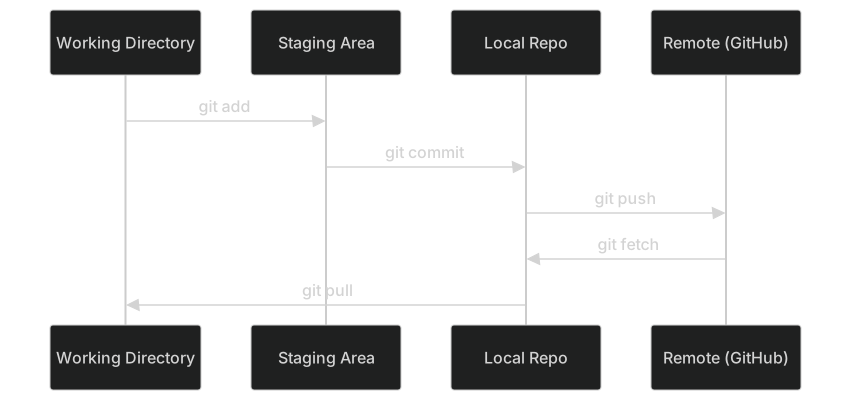
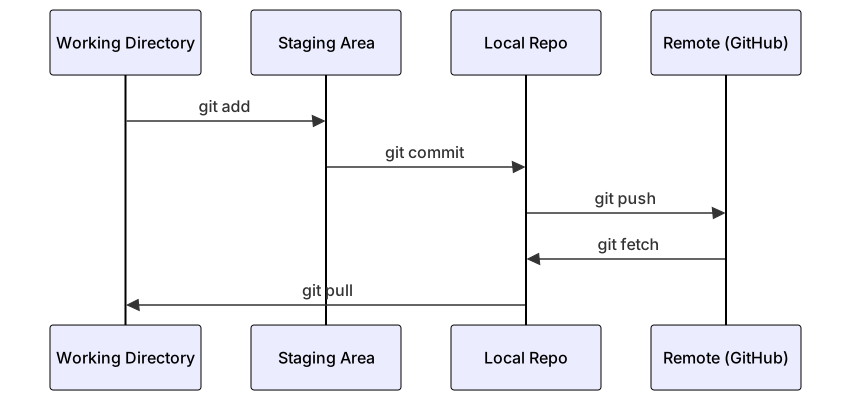
Three things to remember:
- Save often (
git commit) - Push to remote (
git push) - Branch for experiments (
git checkout -b experiment)
s0-commit-dagBuild It
Step 1: Configure git
git config --global user.name "Your Name"
git config --global user.email "you@example.com"
Step 2: The daily workflow
git status
git add file.py
git commit -m "Add perceptron implementation"
git push origin main
Step 3: Branching for experiments
git checkout -b experiment/new-optimizer

# ... make changes, commit ...

git checkout main
git merge experiment/new-optimizer
Step 4: Working with this course repo
You can't push to the course repo itself — only maintainers have write access. Fork it on GitHub first (the Fork button, top right) so origin points at your own copy:
git clone https://github.com/YOUR-USERNAME/ai-engineering-from-scratch.git
cd ai-engineering-from-scratch

git checkout -b my-progress
# work through lessons, commit your code
git push origin my-progress
Use It
For this course, you need exactly these commands:
| Command | When |
|---|---|
git clone |
Get the course repo |
git add + git commit |
Save your work |
git push |
Back it up to GitHub |
git checkout -b |
Try something without breaking main |
git log --oneline |
See what you've done |
That's it. You don't need rebase, cherry-pick, or submodules for this course.
Exercises
- Fork this repo, clone your fork, create a branch called
my-progress, make a file, commit it, push it - Create a
.gitignorethat excludes model checkpoint files (.pt,.pth,.safetensors) - Look at the commit history of this repo with
git log --onelineand read how lessons were added
Hints
Exercise 1. Click Fork on GitHub, then git clone the URL of your own fork. After git push -u origin my-progress, open your fork on GitHub and confirm that the branch list shows my-progress with your file.
Exercise 2. Add one pattern per extension, such as *.pt, to a .gitignore file in the repository root. Create an empty file with each extension and run git status; none of them may appear in the list of untracked files.
Exercise 3. Run git log --oneline and then git log --oneline -- phases/00-setup-and-tooling to show only the commits that changed this phase. Pick one commit and run git show --stat <hash> to see which lesson files it added.
Key Terms
| Term | What people say | What it actually means |
|---|---|---|
| Commit | "Saving" | A snapshot of your entire project at a point in time |
| Branch | "A copy" | A pointer to a commit that moves forward as you work |
| Merge | "Combining code" | Taking changes from one branch and applying them to another |
| Remote | "The cloud" | A copy of your repo hosted somewhere else (GitHub, GitLab) |
Check yourself
Quick quiz
What does 'version control' primarily help you do?
- Automatically fix bugs in your code
- Speed up code execution
- Track changes to files over time and collaborate with others
- Compress files to save disk space
Show the answer
C. Track changes to files over time and collaborate with others Version control systems like git track every change made to files, allowing you to revert to previous states and collaborate with others on the same codebase.
What is a 'repository' in the context of software development?
- A package manager for installing libraries
- A collection of files and their complete change history managed by version control
- A database for storing user data
- A cloud storage service like Google Drive
Show the answer
B. A collection of files and their complete change history managed by version control A repository (repo) is a directory tracked by git that contains all project files along with the full history of changes made to those files.
What is the correct sequence for saving and backing up your work in git?
- git push, git add, git commit
- git clone, git add, git push
- git add, git commit, git push
- git commit, git add, git push
Show the answer
C. git add, git commit, git push First you stage changes with 'git add', then save a snapshot with 'git commit', then upload to the remote with 'git push'. This is the daily workflow.
What does 'git checkout -b experiment/new-optimizer' do?
- Creates a new branch named experiment/new-optimizer and switches to it
- Deletes the branch experiment/new-optimizer
- Downloads a branch from GitHub called experiment/new-optimizer
- Reverts all files to match the experiment/new-optimizer branch
Show the answer
A. Creates a new branch named experiment/new-optimizer and switches to it The '-b' flag creates a new branch with the given name and immediately switches to it, allowing you to experiment without affecting the main branch.
Why should you add '.pt', '.pth', and '.safetensors' to your .gitignore?
- They are model checkpoint files that are too large for git and can be re-generated
- Git cannot track binary files of any kind
- They are Python test files that should not be committed
- They contain sensitive API keys
Show the answer
A. They are model checkpoint files that are too large for git and can be re-generated Model checkpoint files (.pt, .pth, .safetensors) are often gigabytes in size. Git is not designed for large binary files, so these should be excluded and re-generated or stored separately.
Questions people ask
What is the difference between Git and GitHub?
Git is the tool that tracks changes on your own computer. GitHub is a hosted service that stores Git repositories online so teams can share them, review changes in pull requests and run automated checks. Alternatives to GitHub include GitLab and Bitbucket.
Should I commit large datasets or model files to Git?
Usually not. Git slows down with big binary files. Teams keep code in Git and store large data and model weights in object storage, a model hub, or Git LFS, then record which version of the data was used so results can be repeated.
Lessons from AI Engineering from Scratch by Rohit Ghumare and contributors, MIT license. Notes for owners by Lozo. License